Caching - Varnish & Cloudflare
Caching your public pages in Drupal significantly boosts site performance by serving stored, static versions of your pages. This means visitors experience near-instant loading times, making the site more enjoyable to navigate. Additionally, because pages aren’t dynamically generated on each request, caching reduces the workload on the server, ensuring it remains efficient even during high traffic. Ultimately, this approach not only enhances user satisfaction but also contributes to a stable, resilient website infrastructure.
Caching Architecture
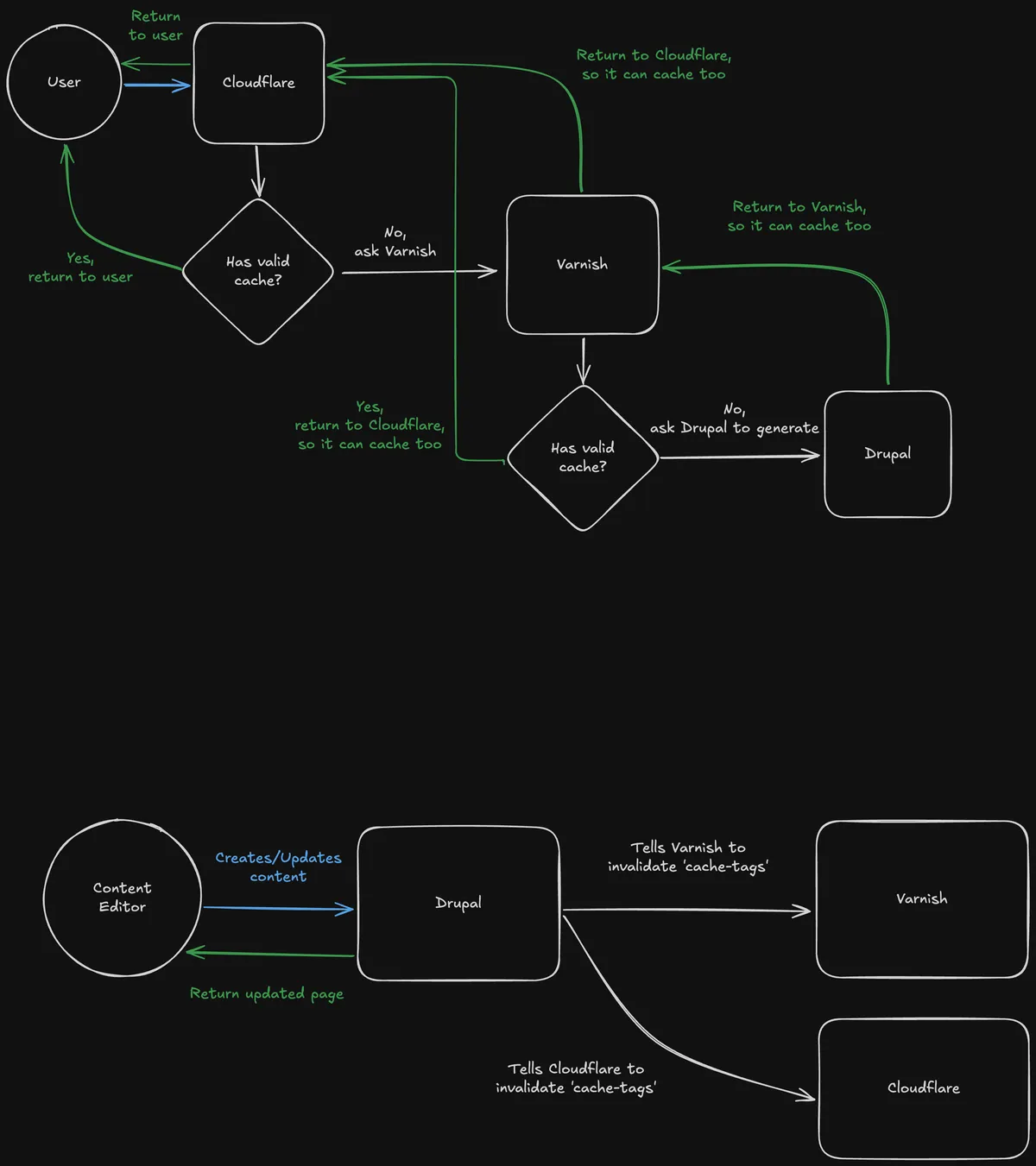
Section titled “Caching Architecture”There are two caching layers in place — Varnish and Cloudflare.
First, pages are cached locally by Varnish which runs on the same VM as Drupal. And then additionally by Cloudflare — an external service. The reason for this is that Varnish is a more flexible caching solution, while Cloudflare provides additional security benefits such as DDoS protection. If a critical error were to occur to the VM, Cloudflare would still serve cached pages even if the underlying server is unavailable, ensuring the site remains accessible.
Purging
Section titled “Purging”When a page is updated, the cache needs to be purged to ensure visitors receive the latest version. This is handled automatically by Drupal, which invalidates the cache when content is modified.
This is achieved via purging modules for Varnish and Cloudflare.